使用域名查找任何公司的电子邮件
使用全名查找专业电子邮件
根据关键字和位置查找公司
从YouTube频道中找到公司电子邮件
从Twitter个人资料中查找公司邮箱
找到企业并提取他们的电子邮件地址
验证电子邮件质量和可投递性
检测临时和一次性邮件
通过 API 查找任何域的电子邮件
通过 API 验证电子邮件投递情况
用职位、地点等信息丰富潜在客户
检测实时B2B购买信号
从 YouTube 和 Twitter 个人资料查找电子邮件
通过API检测虚假注册
将Minelead集成到您的应用程序中
在浏览器中访问所有Minelead功能
连接CRM平台和工具
通过推荐朋友来赚取积分

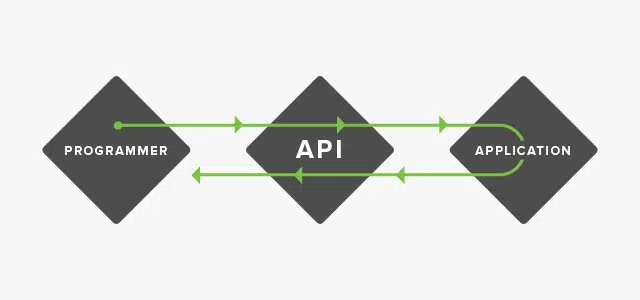
API stands for Application Programming Interface, it is the mechanism that enable two software components to communicate with each other using a set of definitions and protocols, This can simplify app development, saving time and money
APIs are sometimes thought of as contracts, with documentation that represents an agreement between parties: If party 1 sends a remote request structured a particular way, this is how party 2’s software will respond.
In the following example, we will make a python script together to benefit from Minelead api services.
Requirements
1- You need to have python installed
2- Install requests package using the command: pip install requests
3- Get the api key from your Minelead profile
We will call a remote server through its url, in this example it is the Minelead api.
Authentication
We generally need to authenticate ourselves using unique api keys to let the server know who we are and what are we authorized to do.
The api key is passed most of the time as a query string in the url, or as a header in the headers object
Following the Minelead API docs the key should be passed in the url.
In this first step, We will first try to get a list of companies from one or multiple keywords as follows:
import requests
api_key = 'api_key goes here'
api_url = 'https://api.minelead.io/v1/'
def get_companies_leads(tags):
#The url for the leads generation using keywords
url = f'{api_url}tags/?key={api_key}'
#The body of the request that contains the submitted keywords
body = {'tags':tags}
#Make the api call and return the json-encoded results
results = requests.post(url,json=body).json()
#Extract the companies' array from the response (This example will return +4000 companies)
companies = results.get('companies')
return companies
get_companies_leads(['hotel'])
Using this simple function we can retrieve thousands of leads and use them afterwards to get their emails.
- To pass the http request to the api we imported the requests package previously installed.
- The api should return results based on the arguments passed either in the url or in the body of the request, in this step following the docs, we should pass the keywords as an array.
- The results we get from that post request could be formatted to the json format using the json() method.
- From the response we can store the companies in a variable and return it.
The same way we passed a POST request to the Minelead api, there is some ressources that should be called using a GET request
but this time instead of passing arguments in requests body, we should pass them in the url as query parameters
def get_emails(tags):
- We called the function defined in the first step and stored its results in a variable.
- If we print the value of that variable we can see that it is a list of companies, which enable us to iterate over them, and that was we did.
- We passed the domain name of the company in each iteration step and formatted the response to the json format.
- For every request, if the status of response if 'found' it means that we got emails, so we add them to the list of emails defined at the top of the function.
- Finally we can return the list.
The results we got so far are stored in variables which means that they would be lost and the memory by them taken will be freed, to store our results in this example, the best way would be to save them in a csv file.
import csv
def store_leads_in_csv(tags):
#get the emails of the companies retrieved
emails = get_emails(tags)
#open the new csv file we want our results to be stored in
with open('leads.csv','w',newline='') as file:
writer = csv.writer(file)
#write the header
writer.writerow(["email","verified","quality"])
for email in emails:
email_address = email.get('email')
verified = email.get('verified')
quality = email.get('quality')
#write the information of every email in a new row
writer.writerow([email_address,verified,quality])
store_leads_in_csv(['hotel'])
- Python has a great built-in module called CSV, we used it to write a CSV file and named it 'leads.csv'.
-To write in the CSV file we should initiate the writer and give the name of the outrput file and the mode (read / write / append...).
- And finally for every email we get the information needed and write in a row.
import requests
import csv
api_key = 'api_key goes here'
api_url = 'https://api.minelead.io/v1/'
def get_companies_leads(tags):
#The url for the leads generation using keywords
url = f'{api_url}tags/?key={api_key}'
#The body of the request that contains the submitted keywords
body = {'tags':tags}
#Make the api call and return the json-encoded results
results = requests.post(url,json=body).json()
#Extract the companies' array from the response (This example will return +4000 companies)
companies = results.get('companies')
return companies
def get_emails(tags):
def store_leads_in_csv(tags):
#get the emails of the companies retrieved
emails = get_emails(tags)
#open the new csv file we want our results to be stored in
with open('leads.csv','w',newline='') as file:
writer = csv.writer(file)
#write the header
writer.writerow(["email","verified","quality"])
for email in emails:
email_address = email.get('email')
verified = email.get('verified')
quality = email.get('quality')
#write the information of every email in a new row
writer.writerow([email_address,verified,quality])
store_leads_in_csv(['hotel'])
An API is just the middleman that get the requests and serve the results without the need of a graphical interface.
Using APIs to automate tasks will bring efficiency and save time and money,
B2B 潜在客户近在咫尺